Article Details
Review the content, attachments, and feedback.
Article Details
Review the content, attachments, and feedback.
Enable HTTP/2 on Apache
Enable HTTP/2 on Apache
Let’s enable the Apache HTTP/2 module:
sudo a2enmod http2If you’ve been following my guide The Ultimate Web Server then you’ll already have an Apache Virtual Host file for your website. If not, replace the file name below with default-ssl.conf.
Open your website’s configuration file (replace ricbre.com with your domain name):
sudo nano /etc/apache2/sites-enabled/ricbre.com-le-ssl.confJust below the <VirtualHost *:443> tag, type or copy/paste the following code:
Protocols h2 http/1.1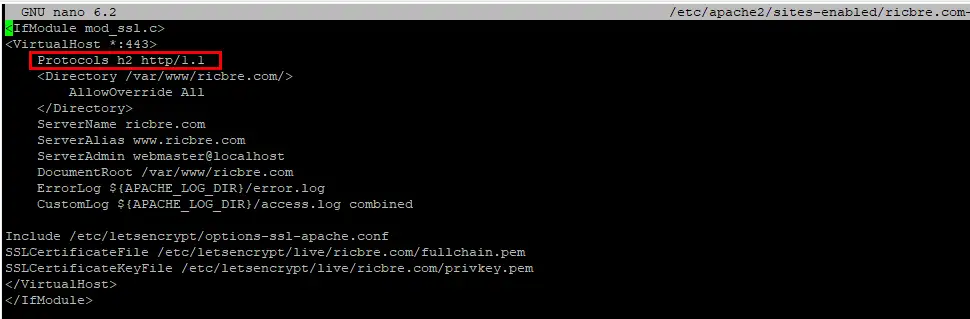
Then save ctrl + o, ENTER and exit nano ctrl + x.
To apply the changes, restart Apache web server:
sudo systemctl restart apache2Configure PHP Modules
We need to find what PHP version you’re running. Enter the following and take note of the result (mine is version 8.1):
php -vNow we install the php-fpm module:
sudo apt-get install php-fpmWe need to disable mod_php, so enter the following but replace 8.1 with your PHP version:
sudo a2dismod php8.1Enable the PHP-FPM mod but again, replace 8.1 with your version:
sudo a2enconf php8.1-fpmThen we enable the proxy_fcgi mod:
sudo a2enmod proxy_fcgiEnable MPM EVENT
By default, Apache will use the mpm_prefork which is not compatible with HTTP/2, so we need to replace it with the newer mpm_event module:
sudo a2dismod mpm_preforksudo a2enmod mpm_eventThen we restart Apache:
sudo systemctl restart apache2Test if HTTP/2 is Enabled
Let’s check if HTTP/2 was successfully enabled by using the curl command (replace ricbre.com with your domain name):
curl -I --http2 -s https://www.ricbre.com/ | grep HTTP